Month: February 2024

  • Circuit Editor Basic Operations Guide in QucsStudio

    Circuit Editor Basic Operations Guide in QucsStudio

    Qucs Studio is an advanced circuit simulation software. This article provides a detailed explanation on how to use Qucs Studio. It introduces various methods of operation using the mouse and keyboard in an easy-to-understand table format. Mastering these methods will allow you to use Qucs Studio more effectively. General Operations Action Description Mouse Wheel Scroll…

  • How to Create and Utilize Subcircuits in QucsStudio

    How to Create and Utilize Subcircuits in QucsStudio

    Introduction Subcircuits are small circuit blocks or modules that function independently within a larger electronic circuit. When designing circuits with Qucs Studio, subcircuits can simplify large-scale or complex designs. This article explains how to create and use subcircuits in Qucs Studio. Creating Subcircuits In this tutorial, we will design a 3rd-order LC low-pass filter and…

  • Circuit Optimization Guide in QucsStudio

    Circuit Optimization Guide in QucsStudio

    Qucs Studio is a powerful circuit simulation tool, and with its “Circuit Optimizer” feature, you can optimize specific component values to achieve desired circuit operation. This article introduces the specific steps to do so. Step 1: Design the Circuit to be Optimized The circuit we want to optimize is as follows: A power source with…

  • Beginner’s Guide to Digital Simulation in QucsStudio

    Beginner’s Guide to Digital Simulation in QucsStudio

    Getting Started with Digital Simulation in Qucs Studio Qucs Studio is a powerful tool that supports digital simulation. This article explains the content listed in the Help file in an orderly fashion. Step 1: Selecting Digital Components Let’s make a simple logic circuit with two inputs and one AND gate.Place the “digital source” and “n-port…

  • How to Perform DC Analysis in QucsStudio

    How to Perform DC Analysis in QucsStudio

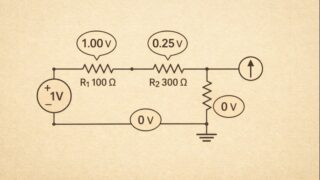
    Today, we’ll delve into how to create a simple circuit diagram using a resistor and perform DC analysis with Qucs Studio. Mastering this basic process will solidify your foundation in electronic engineering. 1. Creating the Circuit Diagram First, open Qucs Studio and create a circuit diagram using a basic component, the resistor. This process involves…

  • Starting Electronic Circuit Design with QucsStudio: A Beginner’s Guide

    Starting Electronic Circuit Design with QucsStudio: A Beginner’s Guide

    Introduction This article explains the basic steps to create an electronic circuit project using Qucs Studio. Qucs Studio is a powerful circuit simulation software with an intuitive and user-friendly interface. Let’s start learning from the basics! What is a Qucs Studio Project? A project is the foundation of all work in Qucs Studio. Within a…