When you look into uSimmics, formerly QucsStudio, or LTspice, you may also come across the name Qucs-S. Because the names are similar, it can be easy to get confused. However, their design concepts and areas of strength are quite different. In this article, we will explain what Qucs-S is, why it exists, and how it differs from uSimmics, formerly QucsStudio, and LTspice.
What You Will Learn in This Article
- What Qucs-S is and who develops it
- The concept of a “fork” and how the Qucs family branched out
- How Qucs-S connects to SPICE engines such as Ngspice and Xyce
- A feature comparison of LTspice, uSimmics, formerly QucsStudio, and Qucs-S
- When Qucs-S is suitable and when it is not
What Is Qucs-S?
Qucs-S is an open-source circuit simulator developed by Vadim Kuznetsov, also known as ra3xdh. The “S” in the name stands for SPICE.
It supports both Linux and Windows and is published on GitHub. The latest version is v25.2.0, released in September 2025.
Why Was Qucs-S Created?
To understand the background of Qucs-S, it is useful to first understand the concept of a “fork.”
A fork means copying the source code of existing software and developing it independently in a different direction or for a different purpose. It is like using the same recipe as a starting point: one person adds more spices, while another changes the ingredients and creates a completely different dish. This kind of branching development is called a fork.
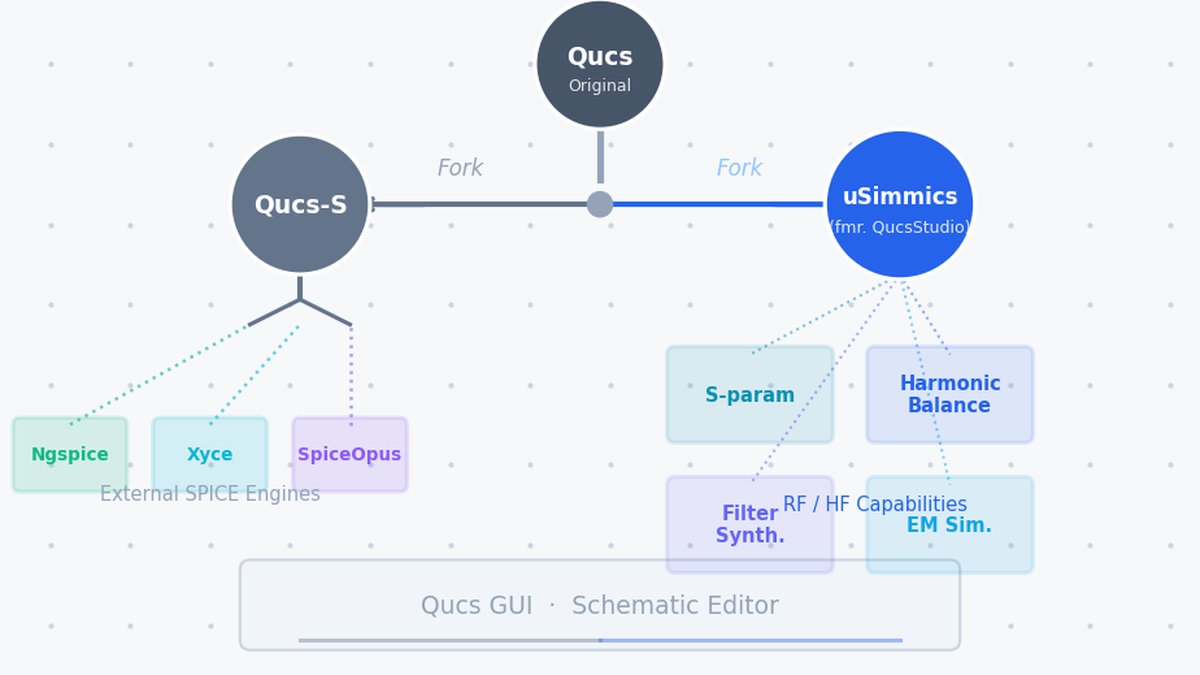
Qucs-S is a circuit simulator forked from the original Qucs, or Quite Universal Circuit Simulator, project. uSimmics, formerly QucsStudio, was also forked from Qucs and evolved independently. However, Qucs-S and uSimmics have developed in completely different directions.
Qucs (Original)
    │
    ├── Qucs-S    ← Forked with a focus on SPICE engine integration
    │
    └── QucsStudio (now uSimmics)
                  ← Forked with a focus on RF and high-frequency features
To learn more about the full history of QUCS and how it evolved into uSimmics, see: QUCS vs uSimmics: Evolution and Key Differences.
The Problem That Led to the Fork
The original Qucs simulation engine, called “Qucsator,” is not compatible with SPICE. The same is true for uSimmics, formerly QucsStudio.
SPICE is a standard circuit simulation format developed at the University of California, Berkeley in the 1970s. Semiconductor manufacturers around the world publish device models in this format. However, Qucs and uSimmics, formerly QucsStudio, cannot use these SPICE models directly.
Qucs-S was created to solve this problem. Its concept is to keep the Qucs graphical user interface while connecting it to external SPICE engines.
How Qucs-S Connects to SPICE Engines
Strictly speaking, Qucs-S itself is not the simulation engine. It works as a bridge that connects the Qucs-style interface to external SPICE engines.
Several engines can be connected.
| Engine | Features |
|---|---|
| Ngspice | The most common option. Open source and general-purpose. |
| Xyce | Developed by Sandia National Laboratories. Suitable for large-scale circuits. |
| SpiceOpus | Suitable for optimization-oriented simulations. |
By switching engines, Qucs-S can be used differently depending on the purpose. This is a feature that LTspice and uSimmics, formerly QucsStudio, do not have.
Feature Comparison of the Three Tools
| Item | LTspice | uSimmics, formerly QucsStudio | Qucs-S |
|---|---|---|---|
| Engine | SPICE | Original | SPICE, via external engines |
| SPICE model compatibility | Excellent | Not supported | Excellent |
| DC / AC / transient analysis | Excellent | Excellent | Excellent |
| S-parameter analysis | Limited | Excellent | Limited |
| Harmonic balance analysis | Not supported | Excellent | Not supported |
| Electromagnetic simulation | Not supported | Excellent | Not supported |
| Smith chart | Limited | Excellent | Limited |
| Filter synthesis | Not supported | Excellent | Not supported |
| Multiple engine switching | Not supported | Not supported | Excellent |
| Open source | No | No | Yes |
| Supported OS | Windows / Mac | Windows | Linux / Windows |
| Installation | Required | Not required, only ZIP extraction | Required |
When Qucs-S Is a Good Choice
Qucs-S becomes a good option in the following cases.
-
When you mainly use Linux: Qucs-S provides a better environment than LTspice or uSimmics, formerly QucsStudio. uSimmics is Windows-only, and LTspice does not officially support Linux.
-
When you already have Qucs schematic assets, such as .sch files: You can open and continue using them in Qucs-S.
-
When open source is important to you: Both LTspice and uSimmics, formerly QucsStudio, are closed source. Qucs-S publishes all of its source code on GitHub.
When Qucs-S Is Not a Good Choice
On the other hand, Qucs-S is not suitable for the following purposes.
-
When your main purpose is RF or high-frequency design: In this case, choose uSimmics, formerly QucsStudio, instead of Qucs-S. Qucs-S does not include key RF design functions such as harmonic balance analysis, electromagnetic simulation, and filter synthesis.
-
When you want to get started easily on Windows: LTspice or uSimmics, formerly QucsStudio, is easier to install and start using. Qucs-S requires separate installation and connection of external engines such as Ngspice, so the initial setup takes more effort.
-
When you want to quickly use SPICE models from specific manufacturers such as Analog Devices: LTspice provides a more prepared environment for this purpose.
How to Choose Between the Three Tools
These three tools are not simply competitors. Each has its own area of strength.
- RF and high-frequency design → uSimmics, formerly QucsStudio
- Analog and power supply design → LTspice
- Linux environment, SPICE asset reuse, and open-source preference → Qucs-S
If your main goal is high-frequency design, I recommend starting with uSimmics, formerly QucsStudio. LTspice is a good choice when you need power supply or analog circuit simulation, while Qucs-S is worth remembering as an option when you want to use Linux or existing SPICE assets.
Summary
- Qucs-S is an open-source circuit simulator forked from Qucs.
- The “S” in Qucs-S stands for SPICE. It works as a bridge for using SPICE engines through the Qucs graphical interface.
- Qucs-S itself is not the simulation engine; it is used by connecting external engines such as Ngspice.
- It is not suitable for RF or high-frequency design. For that purpose, uSimmics, formerly QucsStudio, is the better choice.
- Qucs-S is an option when you use Linux, want to reuse SPICE assets, or value open-source software.
Related Articles
- LTspice vs uSimmics, formerly QucsStudio: Differences and Comparison [2026 Edition]
- What Is uSimmics? Summary of Changes from QucsStudio [2026 Edition]
- How to Install uSimmics, formerly QucsStudio [2026 Edition]
- uSimmics, formerly QucsStudio, Basic Operation Tutorial Part 1 [2026 Edition]
- Roadmap to Mastering uSimmics: Course List by Purpose
- QUCS vs uSimmics: Evolution and Key Differences


Comment