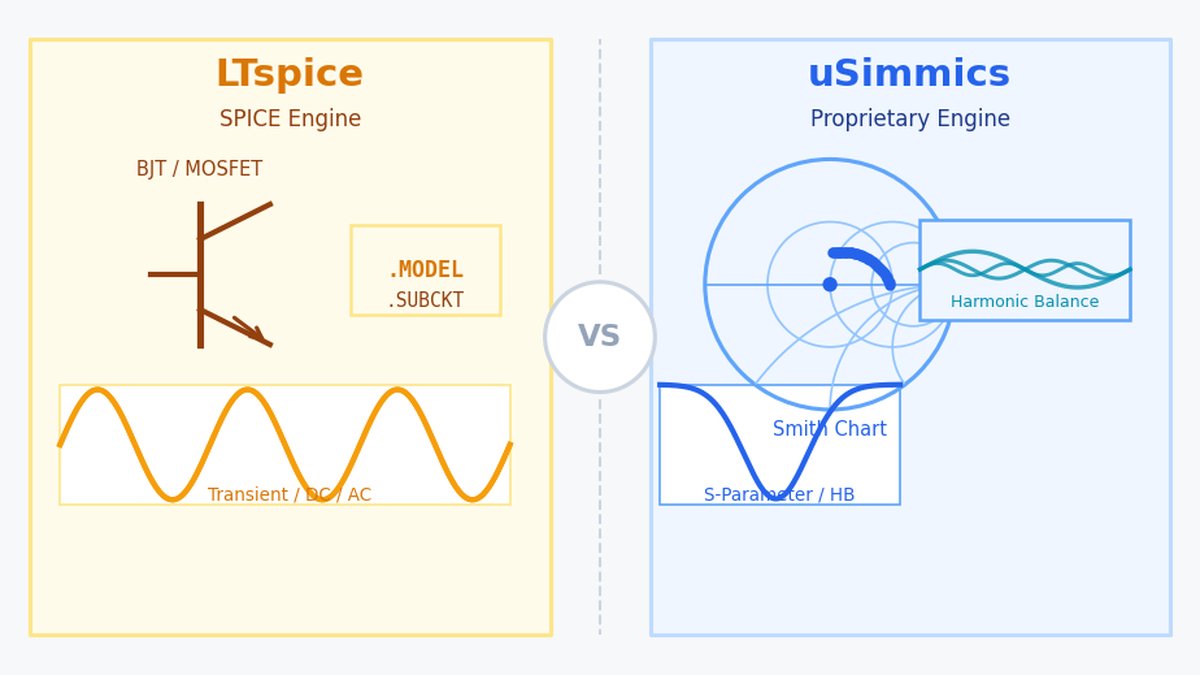
When searching for free circuit simulators, LTspice and uSimmics (formerly QucsStudio) consistently appear at the top. Both are free, both are used in professional settings — but their simulation engines and core strengths are fundamentally different. This article cuts through the confusion and helps you choose the right tool based on what you actually need to design.
What You Will Learn
- The core engine difference between LTspice (SPICE) and uSimmics (proprietary)
- Feature-by-feature comparison table
- When to choose LTspice vs. uSimmics for your specific workflow
- Where Qucs-S fits as a third option
- A practical recommendation for engineers starting out
What Is LTspice?
LTspice is a free SPICE simulator provided by Analog Devices (formerly Linear Technology). It runs DC, AC, and transient analyses at high speed and ships with an extensive library of Analog Devices component models. It is widely used for analog circuit design, switching power supply simulation, and op-amp circuit analysis.
LTspice supports Windows and macOS. The latest version is v26 (released December 2025), distributed as a traditional installer.
What Is uSimmics (formerly QucsStudio)?
uSimmics (formerly QucsStudio) is a free circuit simulator developed by Michael Margraf (DD6UM). It uses a proprietary simulation engine — not SPICE — which makes it incompatible with SPICE device models but enables capabilities that SPICE inherently lacks: S-parameter analysis, harmonic balance, FDTD electromagnetic simulation, and transmission line synthesis.
uSimmics is Windows-only and requires no installation — just extract the ZIP and run the executable. The latest version is v5.9 (January 2026). For background on the QucsStudio rename, see What Is uSimmics? Key Changes from QucsStudio Explained [2026].
The Core Difference: Simulation Engines
The most fundamental difference is the engine.
LTspice uses the SPICE engine — the circuit simulation standard developed at UC Berkeley in the 1970s. Virtually every semiconductor manufacturer publishes device models in SPICE format. LTspice can consume these models directly, which is its greatest practical advantage.
uSimmics uses a proprietary engine derived from Qucsator. This means SPICE models are not usable in uSimmics. In return, uSimmics handles the domains where SPICE struggles: S-parameters, harmonic balance, electromagnetic simulation, and RF system-level analysis.
(The tool that tries to bridge this gap — using Qucs’s GUI with an external SPICE engine — is Qucs-S. See What Is Qucs-S? [2026] for details.)
Feature Comparison
| Feature | LTspice | uSimmics (formerly QucsStudio) |
|---|---|---|
| Simulation engine | SPICE | Proprietary (non-SPICE) |
| SPICE model compatibility | ◎ | ✕ |
| DC / AC / Transient analysis | ◎ | ◎ |
| S-parameter analysis | △ | ◎ |
| Harmonic balance analysis | ✕ | ◎ |
| EM simulation (FDTD) | ✕ | ◎ |
| System-level simulation | ✕ | ◎ |
| Smith Chart display | △ | ◎ |
| Filter synthesis | ✕ | ◎ |
| Impedance matching design | ✕ | ◎ |
| KiCad integration | ✕ | ◎ |
| Switching power supply design | ◎ | △ |
| Device model library depth | ◎ | △ |
| Operating system | Windows / macOS | Windows (other OS via Wine) |
| Installation | Required | Not required (ZIP extract) |
When to Choose LTspice
LTspice is the right choice when your work centers on analog and power electronics. Its SPICE model compatibility means you can drop in real-world component models from Analog Devices, Texas Instruments, Infineon, and others. For op-amp circuits, switching regulators, and BJT/MOSFET characterization, LTspice is fast and reliable.
LTspice is also the default choice on macOS — uSimmics has no native macOS build.
When to Choose uSimmics (formerly QucsStudio)
If your work involves RF and high-frequency circuit design, uSimmics is the clear choice. LTspice cannot replicate its S-parameter analysis, harmonic balance solver, Smith Chart tools, filter synthesis, transmission line calculator, or electromagnetic simulation.
The topics covered on this blog — RF circuits, EMC, transmission lines, signal integrity — all fall squarely within uSimmics’s strengths.
Qucs-S: The Third Option
When neither tool fits, Qucs-S becomes relevant. It pairs Qucs’s schematic GUI with external SPICE engines (Ngspice, Xyce, SpiceOpus), making SPICE model assets accessible to Qucs users. However, it lacks the RF-specific capabilities of uSimmics and is more at home on Linux than Windows. Full details: What Is Qucs-S? [2026].
Practical Recommendation
Start with uSimmics if RF or high-frequency design is your primary goal. Add LTspice later when analog or power work requires SPICE model fidelity. Consider Qucs-S only if you need to reuse existing SPICE assets on a Linux system.
The three tools complement rather than compete with each other.
Summary
- LTspice: SPICE-based, strong for analog/power design, broad device model support
- uSimmics (formerly QucsStudio): proprietary engine, best-in-class RF/HF/EM capabilities, no SPICE compatibility
- Qucs-S: SPICE engine on a Qucs GUI, suitable for Linux users and SPICE asset reuse
- For RF/HF design, uSimmics is the shortest path to productive simulation

Comment